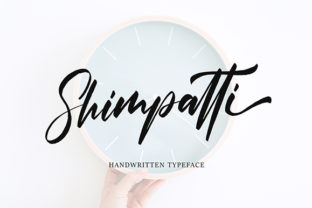
Shimpatti: A Retro Script Font That Balances Playfulness and Legibility
Shimpatti is a hand-drawn script font that evokes the charm of mid-century signage, vintage postcards, and analog lettering—without sacrificing modern usability. Its characters feature subtle irregularities, gentle tapering strokes, and rhythmic spacing that mimic natural handwriting, yet it avoids the excessive flourishes or tight kerning that can hinder readability at smaller sizes. Unlike many retro scripts that lean heavily into nostalgia, Shimpatti maintains enough structural consistency to work across digital interfaces, packaging, and editorial layouts.
What Makes Shimpatti Distinct From Other Script Fonts
Most script fonts fall into one of two broad categories: highly formal calligraphic styles (with sharp contrast and dramatic swashes) or casual brush scripts (with thick, uneven strokes and loose connections). Shimpatti occupies a thoughtful middle ground. Its lowercase “g,” “y,” and “f” include modest descenders with soft curves—not exaggerated loops—and its uppercase letters retain personality without becoming distracting. The font includes standard OpenType features like contextual alternates and ligatures, but they’re applied sparingly, supporting flow rather than demanding attention.
This restraint sets Shimpatti apart from fonts that prioritize visual impact over versatility. For example, some retro scripts rely on heavy baseline shifts or overlapping glyphs to create energy—making them ideal for single-line headlines but impractical for body text or UI labels. Shimpatti’s even x-height and moderate ascender/descender ratio allow it to scale cleanly from 16px interface labels to 72pt poster headlines, provided contrast and spacing are carefully managed.
Where Shimpatti Fits in Real-World Design Workflows
Designers often reach for script fonts when aiming to convey warmth, authenticity, or approachability—especially in branding for food businesses, boutique retail, creative studios, or wellness services. Shimpatti excels in these contexts because it communicates craft and human touch without appearing overly whimsical or dated. A coffee roaster might use Shimpatti for their “Small Batch” label tag, pairing it with a clean sans-serif like Inter or Roboto for ingredient lists and certifications. A ceramics studio could set their workshop schedule in Shimpatti while using a neutral serif for class descriptions—creating hierarchy through tone, not just weight or size.
It also performs well in motion graphics and social media visuals where legibility must hold up at small dimensions and fast pacing. Because its letterforms avoid extreme thinning or fragile terminals, Shimpatti remains legible even when animated with subtle bounce or staggered entry—unlike more delicate scripts that blur or vanish during transitions.
Tradeoffs to Consider Before Choosing Shimpatti
No script font works universally, and Shimpatti is no exception. Its primary limitation lies in extended reading. While short phrases, quotes, or accent text benefit from its rhythm and character, paragraphs set entirely in Shimpatti will fatigue readers quickly. This isn’t a flaw—it’s an inherent constraint of the script category. Users evaluating Shimpatti should ask whether their use case centers on emphasis or exposition.
Another consideration is language support. Shimpatti covers Latin-based languages thoroughly—including accented characters for French, Spanish, German, and Portuguese—but does not extend to Cyrillic, Greek, or non-Latin scripts. If your project targets multilingual audiences beyond Western Europe and the Americas, you’ll need fallback options or complementary fonts for those sections.
Finally, licensing matters. Shimpatti is available under both desktop and web font licenses, but usage rights differ depending on distribution method. Embedding it in a SaaS dashboard or mobile app requires a different license tier than using it in a static PDF brochure. Always verify the license scope matches your deployment context—especially if the design will appear in user-generated content tools or editable templates.
How Shimpatti Compares With Broader Script Categories
Rather than comparing Shimpatti directly to individual fonts, it’s more useful to assess how it aligns with functional categories:
- Formal scripts (e.g., fonts modeled after copperplate or Spencerian): These emphasize precision, contrast, and elegance—ideal for wedding invitations or luxury branding. Shimpatti offers less contrast and more relaxed structure, making it better suited for everyday brands that want sophistication without stiffness.
- Brush scripts: Often bolder and more textured, these thrive in energetic contexts like music posters or streetwear. Shimpatti’s smoother stroke modulation gives it quieter confidence—more fitting for artisanal goods than festival lineups.
- Monoline scripts: Uniform stroke weight makes these highly legible but sometimes feel flat or generic. Shimpatti introduces just enough variation to feel handmade, while retaining enough neutrality to pair well with geometric or humanist typefaces.
This positioning means Shimpatti rarely competes with alternatives—it complements them. You wouldn’t replace a robust text face with Shimpatti, but you might layer it thoughtfully to add voice where tone matters most.
When Shimpatti Is Likely the Right Choice
Shimpatti fits best when three conditions align:
- You need a script that feels intentional—not just decorative—where each character contributes to brand personality without overwhelming function;
- Your application involves short-form text: logos, product names, section headers, quote pulls, or call-to-action buttons;
- You value consistency across formats: print, web, and screen—with minimal manual adjustment needed for spacing or alignment.
A real-world example: A regional bakery launching a new seasonal pastry line used Shimpatti for the flavor name (“Honey Lavender Crème”) on packaging and Instagram posts, while keeping ingredient lists and nutritional info in a clear, accessible sans-serif. The result felt cohesive and inviting—not forced or nostalgic in a way that alienated younger customers.
When Another Option May Serve Better
Consider alternatives if your project demands any of the following:
- High-volume text settings: Menus with dozens of items, long-form editorial features, or instructional documentation require stronger typographic scaffolding than any script can provide.
- Strict accessibility requirements: While Shimpatti meets basic WCAG contrast thresholds at larger sizes, its connected forms and low stroke contrast make it unsuitable as primary UI text for users relying on screen readers or low-vision accommodations.
- Strong cultural or historical specificity: If your brand identity hinges on a precise era (e.g., 1920s Art Deco or 1980s neon signage), Shimpatti’s blended retro sensibility may lack the period accuracy that a more specialized typeface would deliver.
- Multilingual expansion plans: As noted earlier, its character set doesn’t accommodate many non-Latin writing systems. Projects targeting global markets may need modular font systems instead of a single expressive face.
Practical Tips for Using Shimpatti Effectively
Even well-chosen fonts require thoughtful implementation. With Shimpatti, small adjustments yield noticeable improvements:
- Adjust tracking slightly looser than default—especially at smaller sizes—to prevent letters from visually merging;
- Use sentence case instead of all caps for better rhythm; Shimpatti’s lowercase forms carry more of its personality;
- Pair it with typefaces that share similar proportions—avoid extremes like ultra-condensed sans-serifs or high-contrast serifs unless intentionally creating tension;
- Test color contrast rigorously: light gray on white may look elegant in mockups but fail readability checks in production.
Shimpatti rewards attention to detail. It won’t solve weak hierarchy or unclear messaging—but in the right context, it adds nuance, warmth, and distinction that few other script fonts deliver with equal balance.