Rodetta: A Vintage Sans Serif With a Bold, Modern Edge
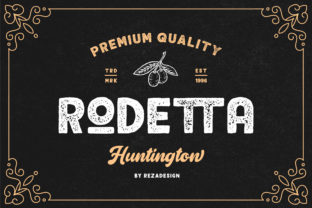
If you’ve ever scrolled through font libraries and paused at Rodetta, you’re not alone. It stands out—not because it shouts, but because it balances heritage and attitude. Rodetta is a vintage-inspired sans serif, rooted in mid-century clarity and proportion, yet sharpened with intentional boldness in its weight distribution, letter spacing, and structural confidence. It’s not retro pastiche; it’s thoughtful reinterpretation. Designers, marketers, educators, and small business owners reach for Rodetta when they need typographic presence without sacrificing readability—whether on a café menu, a course landing page, or a boutique brand identity.
Assuming Rodetta Works Like Any Other “Bold” Font
One of the most common oversights? Treating Rodetta as if it were simply a heavier version of Helvetica or Inter. It’s not. Its boldness isn’t just optical weight—it’s built into the rhythm of the letters themselves. The uppercase A, E, and M carry subtle tapering and open counters; lowercase a and g use a single-story design that enhances cohesion at smaller sizes. When users apply Rodetta at 16px in body text expecting neutral neutrality, they’re often surprised by how assertive it feels—even at modest weights.
This isn’t a flaw—it’s a feature. But misalignment between intention and execution leads to unintended visual tension. For example, pairing Rodetta Light with a generic sans-serif for captions can create hierarchy confusion, not contrast. Instead, use Rodetta’s own weight range thoughtfully: Rodetta Medium for subheads, Rodetta Bold for logos or hero text, and Rodetta Regular (not Light) for short-form UI labels or pull quotes where impact matters more than paragraph flow.
Overlooking Kerning and Tracking in Real Contexts
Rodetta was designed with tight, considered spacing—but that doesn’t mean it auto-adjusts across every platform or size. In web projects, default browser rendering often ignores custom kerning pairs unless you enable font-kerning: normal and test with real content. A headline like “Rodetta Co.” may look uneven at 48px on desktop if letter-spacing is left at zero and font-feature-settings aren’t activated.
Similarly, exporting Rodetta-heavy PDFs for print without embedding full character sets can cause fallbacks—especially with accented characters used in multilingual branding. One freelance designer learned this the hard way when her client’s bilingual event brochure rendered French accents in Times New Roman mid-sentence. The fix? Always preview in final output conditions: test print proofs, inspect live web builds on mobile, and verify language support in the font file’s metadata before purchase.
Downloading Free Versions Without Checking Licensing
You’ll find “Rodetta” listed on several free font sites—but many are outdated, incomplete, or unauthorized derivatives. These versions often lack italics, OpenType features (like stylistic alternates or fractions), and proper hinting for screen use. Worse, some violate the original license, exposing users to legal risk—especially entrepreneurs using them in client work or product packaging.
The official Rodetta family is distributed through reputable foundries and includes variable font options, extended Latin support, and commercial licenses scalable by usage. If budget is a concern, start with the desktop license for internal mockups, then upgrade only when you move to public-facing assets. Never assume “free download = safe to use”—check the source, the copyright line, and the EULA before opening that ZIP file.
Ignoring How Rodetta Performs Across Mediums
Rodetta shines in branding and editorial design—but it’s not universally ideal. Its strong personality makes it less suited for long-form reading (think 1,200-word blog posts or academic handouts), where subtler fonts like Lora or Source Sans Pro offer better fatigue resistance. Likewise, in fast-loading web environments, loading the full Rodetta variable font (with all weights and widths) without subsetting can add unnecessary KBs—slowing perceived performance.
A better approach? Use Rodetta Display variants for headlines and logos, and pair them with a tested, system-optimized companion for body text. For web, consider loading only two weights via @font-face declarations—and always declare a robust font stack fallback (font-family: "Rodetta Bold", -apple-system, BlinkMacSystemFont, "Segoe UI", sans-serif;). Test readability at 120% zoom and with Windows High Contrast Mode enabled. Real-world accessibility isn’t theoretical—it’s measurable.
Skipping the “Why” Before the “How”
Before choosing Rodetta, ask: What role does typography play here? Is it about recognition (a logo)? Clarity (an app interface)? Tone (a newsletter)? Rodetta excels when voice matters—when you want warmth without whimsy, strength without stiffness. But if your goal is quiet professionalism (e.g., a law firm’s website), Rodetta might overstate rather than support.
Try this quick check before committing:
- Compare side-by-side with your current primary font—not just in size, but in context (e.g., a real email subject line or product card).
- Read aloud three sentences set in Rodetta at intended size—does the rhythm feel natural, or does it draw attention to itself unnecessarily?
- Check contrast against your background color using WCAG-compliant tools—not just for AA/AAA, but for real-world glare and ambient light.
And remember: Rodetta isn’t meant to replace every font in your toolkit. It’s a deliberate choice—not a default. Used well, it adds distinction without distraction. Used hastily, it risks feeling like costume rather than character.
Final Thought: Let Rodetta Lead—But Don’t Let It Decide Everything
Rodetta invites confidence. Its structure encourages clean layouts, its proportions reward careful spacing, and its boldness rewards restraint. But no font—no matter how well-designed—substitutes for clear intent, consistent testing, or audience awareness. Whether you’re launching a Shopify store, designing workshop slides, or drafting a grant proposal, let Rodetta serve your message—not overshadow it. Download the trial, set real copy, test on actual devices, and trust what you see—not what the specimen sheet promises. That’s how timeless type becomes truly useful.