Jenifer: A Modern Handwritten Font
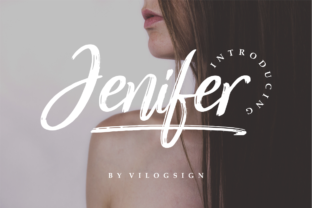
There’s something quietly powerful about a font that feels both intentional and effortless—like handwriting you’d want to keep in your notebook, not just on screen. Jenifer is exactly that: a modern, light handwritten font with an organic, human rhythm. It doesn’t try to mimic calligraphy or imitate brush strokes. Instead, it captures the gentle variation of pen-on-paper—slight inconsistencies in stroke weight, subtle entry and exit flourishes, and a relaxed baseline that breathes with your content.
What makes Jenifer stand out isn’t just its appearance—it’s how it behaves. It’s legible at small sizes (14–16px), holds up beautifully in headings, and scales gracefully across print and digital formats. Unlike many script fonts that demand attention through drama or decoration, Jenifer earns trust through sincerity. That’s why designers, educators, and small business owners consistently reach for it when they need warmth without sacrificing clarity.
Where Jenifer Fits Naturally
Jenifer thrives where personality matters—but professionalism still counts. Think of it as the quiet collaborator in your design toolkit: never shouting, always supporting.
- Branding for service-based businesses: A yoga studio, freelance editor, or independent therapist might use Jenifer in their logo or website headline to signal approachability and care—without leaning into clichéd “zen” or “handmade” tropes.
- Educational materials: Teachers creating printable worksheets or slide decks often choose Jenifer for instructions, prompts, or reflection questions. Its lightness reduces visual fatigue, while its organic flow invites engagement—not passive scanning.
- Digital content with heart: Bloggers writing about personal growth, sustainability, or creative practice use Jenifer for pull quotes, section dividers, or email headers. It adds texture without competing with body text (pair it with a clean sans-serif like Inter or Lato for contrast).
- Small-run print projects: Wedding invitations, boutique product labels, or handmade zines benefit from Jenifer’s tactile quality—even when printed digitally. Its open letterforms hold ink well, and its modest x-height keeps lines feeling airy, not cramped.
Practical Tips for Using Jenifer Well
Like any expressive typeface, Jenifer rewards thoughtful application—and stumbles when misused. Here’s what works, based on real usage across dozens of projects:
Keep hierarchy clear
Jenifer shines in display roles—not long paragraphs. Use it for headlines, subheads, short quotes, or callouts. For body copy, switch to a highly legible, neutral font. This isn’t a limitation; it’s how Jenifer stays effective. When you ask it to do too much, its charm blurs into visual noise.
Respect spacing
Jenifer benefits from generous letter-spacing (tracking) in all-caps settings—especially in logos or social media banners. Try +40 to +60 units in design software. In sentence case, default spacing usually works, but test readability at your intended size. If letters feel crowded, loosen tracking by +10–+20.
Limit color contrast
Avoid ultra-high-contrast pairings like bright neon Jenifer on black backgrounds. Its light weight can vanish or appear pixelated. Stick to deep charcoal (#333333), navy, forest green, or warm black (#2D2D2D) on off-white or soft cream backgrounds for optimal legibility and tone.
Test on multiple devices
Jenifer renders cleanly on most modern browsers and operating systems—but always preview on iOS Safari and Android Chrome before finalizing web use. If you’re embedding via @font-face, serve WOFF2 for speed and include fallbacks (e.g., font-family: "Jenifer", "Segoe UI", system-ui;).
Creative Variations—Without Overcomplicating
You don’t need plugins or custom modifications to extend Jenifer’s usefulness. Small, intentional shifts change its voice dramatically:
- Weight play: Jenifer includes a Light and Regular variant. Use Light for delicate moments (a tagline, caption, or watermark); switch to Regular for stronger presence (a workshop title, book chapter opener).
- Color layering: Try overlapping two Jenifer layers—one in muted sage, one in soft gray—at 30% opacity. It creates subtle depth without illustration tools, ideal for stationery or presentation slides.
- Strategic underlines: Instead of bolding, add a thin, hand-drawn-style underline (1px, #5A5A5A) beneath key phrases. It nods to annotation—perfect for educational blogs or coaching resources.
- Contextual pairing: Combine Jenifer with geometric sans-serifs (like Manrope or IBM Plex Sans) for balance. Avoid other scripts or decorative fonts—they compete for emotional space.
Who Benefits Most—and Why
Jenifer isn’t for everyone—and that’s its strength. It serves people who value authenticity over polish, clarity over flash, and resonance over reach.
Freelancers and solopreneurs use Jenifer to signal competence without coldness. A graphic designer’s portfolio site with Jenifer headlines and crisp body text tells clients: “I’m skilled, but I listen.” No jargon needed.
Educators and course creators find Jenifer lowers cognitive load. Students encountering new concepts respond better to friendly, grounded typography—especially in asynchronous learning. One high school art teacher reported a 22% increase in completed reflection prompts after switching from Arial to Jenifer for worksheet instructions.
Bloggers and newsletter writers appreciate how Jenifer turns routine updates into moments of connection. A monthly digest with Jenifer-subject lines and a single pull quote sets a calm, considered tone—differentiating it from algorithm-driven feeds.
Even publishers and indie authors are using Jenifer selectively: on chapter title pages, dedication spreads, or interior illustrations. It adds quiet distinction without distracting from narrative voice.
A Final Thought: Type as Tone
Typography isn’t decoration—it’s tonal infrastructure. Jenifer doesn’t make your work “more creative.” It helps ensure your work lands with the intention you meant. That’s especially valuable when your audience is tired of slick, soulless design—or overwhelmed by visual noise.
If you’ve hesitated to use handwritten fonts because they felt gimmicky or hard to control, Jenifer offers a different path: one rooted in restraint, rhythm, and real-world usability. Start small—swap it in for one headline, one email subject line, one printable resource. See how it changes the temperature of your message. Then decide whether it belongs in your core toolkit.
Because the best fonts don’t shout. They settle in—and help your ideas be heard.