Aggitha: A Light, Charming Handwritten Font for Human-Centered Design
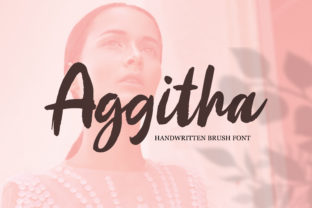
Aggitha isn’t just another handwritten font—it’s a deliberate design choice that brings warmth, approachability, and quiet confidence to digital and print work. With its soft curves, balanced spacing, and gentle rhythm, Aggitha feels hand-drawn without sacrificing legibility or versatility. It’s the kind of typeface you reach for when you want to signal care—not cuteness—and authenticity—not artifice. For professionals who shape messages, build brands, teach ideas, or launch products, Aggitha fits naturally into workflows where tone matters as much as content.
Where Aggitha Fits in Your Creative or Business Process
Fonts are rarely chosen in isolation. They’re selected in context—after defining audience, purpose, and medium—and they serve as a silent collaborator across stages of a project. Aggitha works especially well in the refinement and humanization phases: after structure is set but before final delivery. Think of it as the finishing brushstroke—not the foundation, but the detail that makes the whole feel intentional and grounded.
For example, a marketer finalizing an email campaign might use a clean sans-serif like Inter for body copy (for readability and scannability), then apply Aggitha only to subject lines or CTA buttons. That subtle shift signals warmth without undermining clarity. Similarly, an educator designing a workshop handout may use Aggitha for section headers and quote callouts—keeping body text in a highly legible serif—so learners subconsciously associate key ideas with approachability and trust.
Using Aggitha Before, During, and After Key Work Moments
Before a project begins: Aggitha helps clarify voice and values early. When sketching brand guidelines or drafting a creative brief, using Aggitha in mood boards or internal presentations sets an immediate tonal anchor. It signals that this work prioritizes connection over polish, empathy over edge. Teams often find that choosing Aggitha at this stage leads to more consistent decisions later—fewer revisions on messaging, fewer misalignments in visual direction.
During execution: Aggitha shines in assets where personality supports function—not replaces it. It’s ideal for short-form, high-impact uses: social media story text overlays, podcast episode titles, illustrated blog headers, packaging accents, or slide deck quotes. Because it’s light and charming—not heavy or ornate—it doesn’t compete with imagery or data. Instead, it frames them gently. Designers report faster approval cycles when Aggitha is used selectively in this way: stakeholders intuitively understand its role and rarely ask “Why this font?”—they ask “Where else can we use it?”
After delivery: Aggitha contributes to long-term brand recognition through consistency—not repetition. When used across touchpoints (e.g., a newsletter signature, a thank-you screen in an app, or a printed certificate), it becomes a quiet signature—a familiar hum beneath the message. That consistency builds familiarity without demanding attention. Over time, users begin to associate its rhythm with your voice, even without seeing your logo.
Compatibility and Practical Integration
Aggitha is built for real-world use—not just aesthetic appeal. It includes full Latin character sets, standard OpenType features (ligatures, stylistic alternates), and robust hinting for screen rendering. It performs reliably in Figma, Adobe Creative Cloud, Google Fonts (via self-hosted files), and modern CSS environments. No special plugins or workarounds are needed—just standard font loading and fallback planning.
That said, integration isn’t just technical—it’s contextual. Aggitha pairs cleanly with neutral, functional typefaces: Inter, Lato, Source Sans Pro, or even Georgia for contrast. Avoid pairing it with other decorative or script fonts; the goal is harmony, not competition. In practice, most teams adopt a simple rule: one expressive font, one functional font, one accent color. Aggitha fills the expressive role with minimal overhead.
For developers and no-code builders, Aggitha works best when loaded locally or via a fast CDN. Its file size is modest (~40–60 KB for WOFF2), so it won’t delay page loads if applied thoughtfully—e.g., only on headings or interactive elements, not body paragraphs. Use @font-face declarations with font-display: swap to ensure text remains readable during load.
Workflow Tips You Can Apply Today
- Start small: Replace just one recurring element—like your email signature font or your Notion page title style—with Aggitha. Observe how it shifts perception over a week.
- Define usage boundaries: Decide in advance where Aggitha lives (e.g., “only in headers under 36px” or “only in illustrations, never in data tables”). This prevents visual fatigue and keeps your system scalable.
- Test contrast and hierarchy: Aggitha’s light weight means it needs sufficient background contrast—especially on screens. Always test at 100% zoom on mobile and desktop. Pair it with bold or semi-bold weights of your functional font to maintain clear typographic hierarchy.
- Document it: Add Aggitha to your team’s design system or style guide—not just as a name, but with clear examples of appropriate and inappropriate use. Include real before/after screenshots from your own projects.
- Revisit quarterly: Fonts age with usage. Every few months, scan recent deliverables. Is Aggitha still serving its role—or has it become background noise? Adjust usage scope or pairings as your brand evolves.
What Makes Aggitha Sustainable—Not Just Stylish
Sustainability here isn’t about file size or carbon footprint—it’s about longevity in use. Aggitha avoids trends that date quickly: no exaggerated swashes, no forced irregularity, no forced “imperfection.” Its charm comes from balance, not gimmick. That means it holds up across platforms, devices, and audiences without needing constant reinterpretation.
It also scales well with growth. A solopreneur launching a course can use Aggitha across their sales page, workbook headers, and email banners—and keep using it unchanged as they hire designers or migrate to a CMS. There’s no “premium version” lock-in or licensing complexity. The license covers web, desktop, and app use—no per-page fees or monthly subscriptions.
Most importantly, Aggitha supports quality control. Because it’s legible at small sizes and stable in variable contexts, it reduces last-minute fixes—misaligned letters, clipped descenders, inconsistent kerning. That saves time in QA, approvals, and revisions. One freelance designer noted that switching to Aggitha cut her client font-related revision requests by nearly 70%—not because it’s “perfect,” but because it’s predictable and human-scaled.
Final Thought: Let Aggitha Do Quiet Work
You don’t need Aggitha to solve every design problem. But if your work involves building trust, guiding attention, or softening formality—without losing professionalism—Aggitha earns its place. It’s not a headline-grabber. It’s the steady hand behind the gesture. The pause before the sentence lands. The margin that breathes.
So try it where tone matters most: in the space between what you say and how people feel when they read it. Use it where consistency compounds—across emails, slides, printouts, and dashboards. And let it remind you that thoughtful execution isn’t loud. Sometimes, it’s just light, charming, and exactly right.