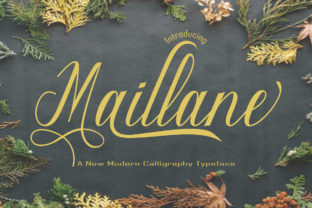
Maillane: A Handwritten Font That Elevates Real-World Design Workflows
Maillane isn’t just another script font—it’s a carefully crafted handwritten typeface with elegant letterforms, subtle contrast, and a distinctive twist: a delicate, intentional irregularity that feels human without sacrificing legibility or refinement. Designed for clarity at scale and warmth in detail, Maillane bridges the gap between expressive personality and professional polish. It fits naturally into workflows where authenticity matters—whether you’re refining a brand identity, preparing a client presentation, crafting educational materials, or launching a small business product.
Where Maillane Fits in Your Creative or Business Process
Fonts aren’t isolated assets—they’re part of a chain: research → concept → layout → feedback → revision → delivery. Maillane enters most effectively during the *refinement* and *differentiation* phases. Before Maillane, you might use a neutral sans-serif to structure content or test hierarchy. Once tone, audience, and intent are clear, Maillane becomes the tool that adds nuance—replacing generic elegance with something memorable and grounded in craft.
For marketers building email campaigns, Maillane works best after copy is finalized and segmentation is confirmed—not as a placeholder, but as a deliberate signal of voice. For educators designing handouts or slide decks, it’s applied after learning objectives are mapped and visual balance tested. That timing matters: introducing Maillane too early risks misalignment; too late means missing opportunities to shape perception from the first glance.
Using Maillane Before, During, and After Key Milestones
Before launch or delivery: Use Maillane in mood boards and style guides to establish tonal consistency across teams. Its rhythm and spacing help stakeholders visualize how warmth and professionalism coexist—especially useful when presenting to non-designers who respond to feeling more than terminology.
During execution: Apply Maillane selectively—not everywhere, but where emphasis needs emotional resonance. Think: section headers in pitch decks, pull quotes in blog posts, signature lines in branded PDFs, or labels on packaging mockups. Avoid body text unless size and line-height are optimized (minimum 24px for screen, 16pt for print). This restraint preserves impact and ensures readability remains intact.
After deployment: Audit usage across touchpoints. Does Maillane appear consistently in logo lockups, social banners, and email footers? If not, document where it should—and shouldn’t—appear. Consistency here isn’t about repetition; it’s about reinforcing recognition through thoughtful placement.
Compatibility and Technical Integration
Maillane ships in OTF and WOFF2 formats, supporting modern design tools and web environments without friction. In Figma or Adobe Illustrator, it behaves predictably—no unexpected kerning shifts or glyph substitutions. On websites, pair it with system-safe fallbacks (e.g., "Maillane", "Segoe Script", cursive) and load it via @font-face with font-display: swap to avoid invisible text during load.
It integrates cleanly with common branding systems: combine Maillane headlines with Inter or Roboto for body copy, or layer it over muted color palettes (think warm greys, soft terracotta, or deep navy) to let its character shine without competing. Avoid pairing it with other decorative scripts—clash in rhythm dilutes its uniqueness.
Practical Implementation Tips for Real Workflows
- Start with hierarchy, not decoration: Define your heading levels first—H1, H2, H3—then assign Maillane only where tone supports the message. A “Welcome” banner benefits from Maillane; a legal disclaimer does not.
- Test at actual size: Render Maillane in context—not just in a font menu. Preview how it looks on mobile screens, printed invoices, or projected slides. Adjust tracking by ±10–20 units if letters feel cramped or loose.
- Limit variations: Maillane includes standard and alternate characters (like swashed capitals or contextual ligatures), but enable them sparingly. One well-placed swash on an initial letter reinforces personality; five scattered across a page reads like noise.
- Document usage rules: Create a one-page internal guide: “Use Maillane for: hero section headlines, testimonial attributions, and CTA buttons. Do not use for: data tables, navigation menus, or multi-line paragraphs.” Clarity prevents drift.
Long-Term Use and Quality Control
Fonts age like any design asset—what feels fresh in Q1 may feel overused by Q4. With Maillane, longevity comes from discipline, not novelty. Revisit usage every quarter: Is it still serving its purpose, or has it become background noise? Track engagement metrics where possible—do landing pages with Maillane headers see higher scroll depth or time-on-page? Correlate, don’t assume.
Also consider accessibility. While Maillane passes basic contrast checks (4.5:1 against white at 24px), avoid using it for critical interface text (e.g., form labels or error messages). Its charm lies in expression—not utility—and respecting that boundary maintains both usability and aesthetic integrity.
Workflow Examples Across Roles
Freelancers pitching services: Use Maillane in proposal cover pages and section dividers—but keep project timelines, deliverables, and pricing in a clean sans-serif. The contrast signals creativity while preserving credibility.
Educators building course materials: Apply Maillane to weekly module titles and reflection prompts. Its warmth invites engagement without distracting from core content—especially helpful when students scan digital handouts quickly.
Small business owners updating packaging: Reserve Maillane for the product name and tagline on front panels. Pair it with a simple, high-contrast sans-serif for ingredients or certifications on the back. This directs attention where it matters most—without overwhelming the shelf.
Bloggers and content creators: Introduce Maillane in newsletter subject lines (via image-based text, where supported) or as embedded SVG headers in long-form posts. It creates visual pause points—helping readers mentally segment ideas before diving into dense text.
What Makes Maillane Distinct in Practice
Many handwritten fonts lean heavily into either whimsy or formality. Maillane avoids both extremes. Its baseline subtly rises and falls, its terminals taper with intention, and its lowercase ‘a’ and ‘g’ carry quiet distinction—not gimmickry. That balance makes it adaptable: equally at home on a wedding invitation and a fintech dashboard illustration.
More importantly, Maillane supports intentionality. You choose it not because it’s trendy, but because it aligns with how you want people to feel when they encounter your work—thoughtful, trusted, and human. That alignment simplifies decisions downstream: less second-guessing font choices, fewer rounds of stakeholder feedback on tone, and faster sign-off on final assets.
Integration isn’t about adding Maillane everywhere—it’s about placing it where it amplifies meaning. When used with awareness of context, audience, and workflow stage, it becomes less of a “font” and more of a consistent, quiet collaborator in how your work is received and remembered.