Straightwell: A Modern Serif for Clarity, Confidence, and Consistent Execution
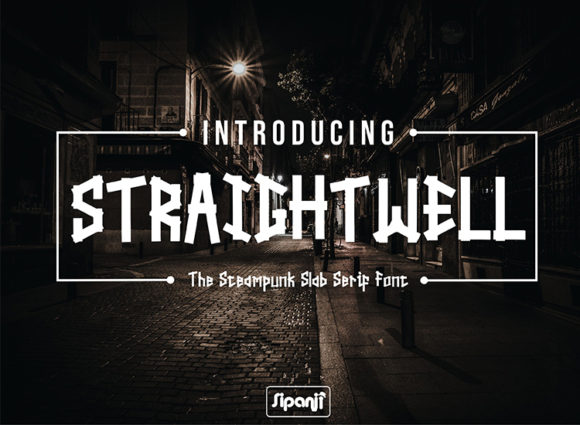
Straightwell is a straightforward and modern serif font with a bold feel—designed not just to be seen, but to support how you think, plan, and deliver. It doesn’t shout; it anchors. Its structure balances tradition and clarity, giving weight to ideas without sacrificing readability or warmth. For professionals who move between strategy sessions, content creation, client presentations, and long-form writing, Straightwell functions as a quiet partner in execution—not a decorative flourish, but a functional element of your workflow.
Where Straightwell Fits in Real Workflows
Fonts aren’t isolated assets—they’re part of a chain: from initial concept to final delivery, from internal notes to public-facing materials. Straightwell sits most naturally where intention meets visibility: when you need readers to trust the message before they even process the words. That makes it especially effective in contexts where authority, coherence, and legibility matter—like pitch decks, editorial layouts, course syllabi, brand guidelines, and product documentation.
Unlike display fonts that demand attention, Straightwell earns it. Its generous x-height, open counters, and deliberate stroke contrast make it highly legible at small sizes—ideal for footnotes, captions, or dense paragraphs. At larger sizes, its bold weight carries presence without heaviness, making it suitable for headlines, section breaks, or interface labels where hierarchy needs to be clear but not aggressive.
Before the Project: Setting Tone and Expectations
Before drafting a single line of copy or sketching a wireframe, many creators define visual tone. That’s where Straightwell becomes a planning tool. Choosing it early signals intent: this will be direct, grounded, and reader-respectful. Designers might pair it with a clean sans-serif (like Inter or Manrope) for UI elements, using Straightwell for all body text and key headings. Writers may adopt it in their drafting environment—setting it as the default in Notion, Obsidian, or Word—to reinforce focus on substance over stylistic distraction.
This isn’t about aesthetics alone. Selecting Straightwell pre-project helps align team expectations. When a marketing lead shares a Figma file with Straightwell as the primary text face, stakeholders immediately understand the communication style: no-nonsense, credible, human-centered. That alignment reduces revision cycles later—because tone was built in, not layered on.
During Creation: Supporting Flow Without Interrupting It
Straightwell works best when it disappears into the process. Its consistent rhythm supports sustained reading—critical for long-form blog posts, white papers, or educational modules. Unlike fonts with high contrast or eccentric letterforms, Straightwell avoids visual fatigue. That means fewer pauses to reorient, less mental overhead spent parsing type, and more bandwidth for thinking through arguments, structuring logic, or refining messaging.
For educators building course materials, Straightwell’s clarity improves accessibility across devices—especially on tablets or e-ink readers where fine serifs often blur. For freelancers delivering brand assets, embedding Straightwell in PDFs or design systems ensures typographic fidelity without requiring clients to install fonts. And for developers integrating into web projects, its variable font version allows precise control over weight and width—optimizing both performance and responsiveness.
Practical Integration Tips
- Start with hierarchy, not decoration: Assign Straightwell to body copy first, then test heading combinations. Avoid overusing its boldest weights—reserve them for impact points like callouts or CTA buttons.
- Pair intentionally: Use a neutral, geometric sans-serif for data labels, navigation, or UI controls. Let Straightwell handle narrative, explanation, and emphasis.
- Test real usage, not mockups: Drop Straightwell into your actual writing app—not just Figma. See how it feels during 20-minute editing sprints or multi-hour research sessions.
- Consider licensing early: Straightwell is available in desktop, web, and app licenses. If you’re building a SaaS dashboard or publishing platform, confirm usage rights match your deployment scope.
After Delivery: Maintaining Consistency Across Channels
One of Straightwell’s underappreciated strengths is longevity. Its design avoids trend-driven quirks—no exaggerated terminals, no forced asymmetry—so it ages well. A report typeset in Straightwell today reads just as confidently five years from now. That matters for documentation, legal disclosures, academic publications, or archival websites where consistency over time isn’t optional—it’s required.
When repurposing content—say, turning a blog post into a slide deck or newsletter—Straightwell holds up across formats. Its spacing adapts cleanly to narrow email columns and wide presentation screens alike. No re-kerning needed. No fallback panic. Just reliable rendering, whether viewed on iOS Safari, Windows Edge, or a printed handout.
How Straightwell Interacts With Other Tools and Decisions
It doesn’t operate in isolation. Straightwell gains strength when paired with intentional systems:
- With typography systems: Define Straightwell as your “voice” font in a design token library—assigning specific weights and sizes to roles like body-small, heading-h3, or caption-emphasis.
- With content tools: Configure it in your CMS editor (e.g., WordPress Gutenberg, Sanity, or Ghost) so writers see accurate formatting while drafting—not just in preview mode.
- With accessibility practices: Its contrast ratio meets WCAG AA standards at 16px and above. Combine it with sufficient line height (1.5–1.6) and left-aligned text for optimal screen reader and low-vision usability.
- With brand evolution: As your business scales, Straightwell provides stability. You can evolve color palettes, illustration styles, or layout grids—while keeping the text foundation steady and recognizable.
What to Watch For: Usability and Long-Term Fit
Straightwell excels in clarity—but it’s not universally ideal. Avoid it for ultra-narrow spaces (like mobile tab labels), extremely short microcopy (<5 characters), or environments demanding maximal neutrality (e.g., government forms where regulatory guidelines mandate specific system fonts). Also, while its bold variants command attention, overuse dilutes impact. Reserve Bold and Black weights for moments where emphasis serves a functional purpose—not just visual variety.
Long-term adoption hinges on two things: technical compatibility and cognitive fit. On the technical side, verify that your platforms support OpenType features like ligatures or discretionary fractions—if those matter to your use case. On the cognitive side, ask: does this font help me get to the point faster? Does it reduce friction when reviewing drafts or sharing feedback? If yes, it’s likely supporting your process—not slowing it down.
Putting It Into Practice: Three Realistic Scenarios
- A small business owner launching a service page: Uses Straightwell for all descriptive copy and testimonials. Pairs it with a lightweight sans-serif for pricing cards and CTA buttons. The result feels trustworthy and approachable—without needing stock photos or animated effects to convey credibility.
- An educator building an online course: Sets Straightwell as the default in their LMS editor and PDF handouts. Adjusts line spacing and paragraph margins to match classroom reading norms. Students report fewer complaints about eye strain during long module sessions.
- A freelance designer updating a client’s brand system: Introduces Straightwell as the new body font, keeping the existing sans-serif for navigation and icons. Documents usage rules clearly—specifying when to use Regular vs. SemiBold, and where not to substitute. The client’s team adopts it within one sprint, with zero training required.
Straightwell doesn’t solve problems on its own—but it removes subtle barriers to solving them. It supports focus when you’re drafting. It reinforces clarity when you’re explaining. It sustains professionalism when you’re delivering. And because it’s built for real use—not just display—it fits quietly into workflows that already exist, rather than demanding new ones. That’s not just good typography. It’s good process design.