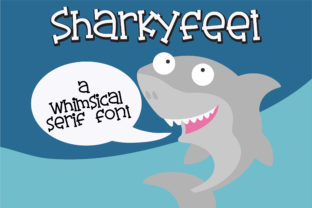
Sharkyfeet: A Whimsical Serif with Real Charm
If you’ve ever scrolled through a font library and paused—not because something looked technically perfect, but because it made you smile—you know the rare magic of Sharkyfeet. It’s not a font built for corporate boardrooms or legal disclaimers. It’s designed for moments that need warmth, personality, and gentle playfulness—without sacrificing readability or typographic integrity.
Sharkyfeet is a hand-influenced serif typeface with soft curves, slightly uneven baseline rhythms, and delicate stroke modulation. Think of it as what happens when a skilled calligrapher sketches a friendly serif on textured paper—then refines it into something crisp enough for screen and print, yet never sterile. Its “adorable feel” isn’t gimmicky; it’s rooted in intentional design choices: rounded terminals, open counters, generous x-height, and subtle asymmetry in letterforms like a, e, and g.
Where Sharkyfeet Fits—and Where It Doesn’t
Not every project needs whimsy—and that’s why understanding Sharkyfeet’s natural habitat matters. It shines where authenticity, approachability, or emotional resonance are priorities. It struggles where neutrality, authority, or dense information density are non-negotiable (think financial reports, technical documentation, or high-traffic UI labels).
That said, its versatility is broader than many assume. Because Sharkyfeet maintains strong letter distinction and consistent spacing, it holds up well at 14–18pt in body text—especially in shorter-form content like email newsletters, blog intros, or illustrated e-books. Its serifs aren’t heavy or dramatic, so it doesn’t overwhelm delicate layouts. And unlike many “cute” fonts, it avoids cartoonish exaggeration—making it far more adaptable across age groups and contexts.
Real-World Uses You Can Start With Today
For educators and creators: Sharkyfeet works beautifully in printable classroom materials—lesson headers, vocabulary cards, or student-facing handouts. Its friendliness lowers cognitive load for younger readers without infantilizing content. One Montessori teacher we spoke with uses it for weekly “wonder prompts” (“What makes clouds blush?”) because students consistently say the words “feel kinder on the page.”
For small business owners and makers: If your brand voice leans toward thoughtful, handmade, or gently nostalgic—Sharkyfeet can anchor your visual identity without needing custom illustration. A ceramicist uses it on product tags and Instagram captions; a local bookstore pairs it with a clean sans-serif for headings in their monthly reading newsletter. The contrast feels intentional, not accidental.
For bloggers and content creators: Try Sharkyfeet for pull quotes, section dividers, or featured story titles. Its rhythm encourages slower reading—a quiet counterpoint to the scroll-driven fatigue many audiences experience. One food writer uses it exclusively for recipe introductions (“This cake remembers summer afternoons”), letting the font do part of the emotional work before the first ingredient appears.
For digital product teams: While not ideal for interface text, Sharkyfeet excels in micro-moments: empty-state illustrations (“Nothing here yet—let’s begin!”), onboarding welcome screens, or celebratory modals (“You’ve unlocked your first badge!”). Paired with system fonts for functional text, it adds tonal depth without compromising performance or accessibility.
What Makes It Stand Out—Beyond the Cuteness
Three practical strengths set Sharkyfeet apart from similar fonts:
- Optical balance for screen use: Its letterforms are subtly adjusted for legibility on mid-resolution displays—not just high-DPI screens. That means it reads cleanly on older tablets or budget laptops without blurring or awkward spacing.
- Thoughtful language support: Includes full Latin-1 coverage plus diacritics used in French, Spanish, German, and Scandinavian languages—so it’s viable for bilingual blogs, small press publications, or EU-based service pages.
- Weight consistency across styles: The regular and italic share near-identical stroke weight and x-height. This avoids the “sinking” effect some serifs suffer when italicized—keeping emphasis clear and layout stable.
Practical Considerations Before You Commit
Sharkyfeet isn’t a drop-in replacement for Times New Roman—but that’s by design. Before licensing or embedding it, ask yourself:
- Does your audience expect warmth—or will they misread it as unserious? A pediatric clinic’s patient portal benefits from Sharkyfeet’s gentleness; a cybersecurity firm’s compliance dashboard likely does not.
- How much text will actually appear in Sharkyfeet? Use it where tone matters most—not everywhere. Overuse dilutes impact and risks visual fatigue. Reserve it for headlines, quotes, calls-to-action, or short descriptive blocks.
- What’s your delivery context? It performs best as a web font served via modern
@font-facewithfont-display: swap. Avoid loading it alongside five other custom fonts—prioritize loading speed and fallback integrity.
Also worth noting: Sharkyfeet includes true small caps and stylistic alternates (like a swash Q or dotted i)—but these should be used sparingly. They’re accents, not defaults. One designer we admire uses the alternate y only in logo lockups, never in running text—keeping charm precise, not pervasive.
A Font That Serves People—Not Just Pixels
At its core, Sharkyfeet reflects a growing shift in typography: away from rigid universality and toward contextual empathy. It doesn’t try to be everything. Instead, it asks quietly, “What feeling does this moment need?” That’s rare—and valuable.
You won’t find Sharkyfeet dominating Fortune 500 websites. But you will find it helping a therapist craft reassuring intake forms, guiding readers through a slow-journaling app, or giving a children’s book illustrator space to breathe between words and imagery. Its power lies in restraint, intention, and quiet confidence—not volume.
If your work involves human connection—even indirectly—Sharkyfeet is worth testing. Not as decoration, but as a tool for clarity, kindness, and quiet distinction. Try it in a single, high-impact place first. See how it changes the temperature of the page. Then decide whether it earns a wider role—not because it’s trendy, but because it fits, honestly and well.