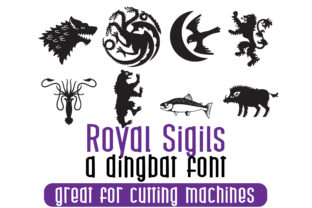
Royal Sigils: A Heraldic Dingbats Font
Royal Sigils isn’t just another decorative font—it’s a thoughtfully crafted set of symbolic glyphs rooted in the visual language of heraldry, reimagined for today’s digital workflows. Each character is a self-contained emblem: lions rampant, fleurs-de-lis, crowned shields, interlaced knots, and stylized crowns—designed not as clip art, but as typographic elements that behave like letters. You type them with a keyboard, scale them with CSS, align them with text, and embed them in documents or web pages without losing crispness or intent. It’s a dingbats font, yes—but one built with the precision and weight of royal insignia.
Why a Heraldic Font Still Matters Today
Heraldry was never just about decoration. It communicated identity, authority, lineage, and values—often at a glance and across distances. Royal Sigils carries that same functional spirit into modern contexts. Its symbols aren’t nostalgic ornaments; they’re versatile visual shorthand. A teacher can use a shield glyph to mark rubric categories in a handout. A small business owner might place a crown icon beside “Premium Support” on their website. A blogger writing about medieval history can punctuate timelines with period-appropriate motifs—without hunting through stock libraries or wrestling with SVG imports.
For Designers & Creative Professionals
If you work with branding, editorial design, or UI assets, Royal Sigils offers something rare: typographic control over symbolic language. Unlike raster icons or standalone SVGs, these glyphs scale infinitely, inherit color and weight from surrounding text, and respond predictably to responsive layouts. You can set a fleur-de-lis as a bullet in a list (• becomes ⚜), use a lion as a section divider, or layer sigils behind headlines using text-shadow or background-clip. No plugins. No extra files. Just font loading and typing.
Experienced users often prioritize flexibility and integration—and Royal Sigils delivers that through OpenType features like stylistic alternates and ligature support. Want a more angular crown? A softer shield outline? Those variants are accessible via CSS font-feature-settings, not separate font files. That means fewer HTTP requests, cleaner code, and faster iteration.
For Educators & Students
In classrooms or online courses, visual consistency helps learners focus on content—not formatting. Royal Sigils gives educators an intuitive way to add structure and tone without cluttering slides or PDFs with external graphics. A history instructor might use the “quartered shield” glyph () to introduce comparative analysis frameworks. A literature professor could assign students to build personal “coat-of-arms” projects using Royal Sigils characters as part of a unit on symbolism and identity.
For students learning typography or design fundamentals, Royal Sigils also serves as a low-barrier entry point: it’s easy to install, works in free tools like Google Docs (via add-ons) and LibreOffice, and doesn’t require vector editing skills. There’s real learning value in seeing how meaning shifts when a symbol moves from illustration to type—from something you insert to something you compose with.
For Small Business Owners & Marketers
You don’t need a full brand refresh to add distinction. Royal Sigils lets you elevate everyday touchpoints: invoice headers, email footers, social bios, or packaging accents—all while keeping file sizes light and licensing straightforward. Since it’s a single font file, there’s no risk of mismatched versions or broken links when sharing assets across teams.
What matters most here isn’t novelty—it’s reliability and clarity. A café owner adding a simple “☕ + 🛡️” combo next to “Locally Owned Since 2015” signals heritage and care in two characters. A craft distiller might use the “crowned barrel” variant (if available in their version) on bottle labels—not as a logo replacement, but as a subtle reinforcement of tradition and craftsmanship. These uses don’t demand expertise—just intention.
For Bloggers, Writers & Content Creators
Text-heavy content benefits from rhythm and pause. Royal Sigils provides visual breath without disrupting flow. Instead of defaulting to horizontal rules or emoji (which vary wildly across devices), you can drop in a finely tuned heraldic divider—like a balanced chevron (🔶) or symmetrical knot (🜂)—that renders consistently everywhere fonts load.
It’s also helpful for accessibility-aware creators: because these are Unicode-adjacent glyphs served via font technology, screen readers skip them by default (unless explicitly labeled), avoiding unnecessary noise. That makes them safer to use than generic icon fonts relying on aria-hidden="true" overrides.
What to Consider Before Using Royal Sigils
Like any tool, its fit depends on your goals—not just your software. Ask yourself:
- Do you need symbols that behave like text? If you’re building dynamic layouts where spacing, alignment, or scaling must be precise, Royal Sigils integrates more smoothly than image-based alternatives.
- Is visual cohesion important? Its consistent line weight, proportion, and spacing mean sigils won’t clash with serif or sans-serif body text—even at small sizes.
- Are you working offline or in restricted environments? Since it’s a local font file, it works in print-ready PDFs, desktop publishing apps, and air-gapped systems where web fonts or icon services aren’t viable.
It’s less ideal if you need photorealistic textures, animated effects, or hundreds of distinct icons per category. Royal Sigils excels in restraint—not abundance.
Getting Started Is Low-Stakes
Installation takes seconds: download the .ttf or .woff2, install system-wide or embed in your site’s CSS. Most platforms—Figma, Adobe Creative Cloud, Canva (with upload), even Notion via custom fonts—recognize it immediately. No tutorials required.
Beginners often start by replacing bullet points or section breaks. Professionals dive into OpenType features or pair it with variable text fonts for layered hierarchy. Neither approach is “wrong.” What matters is whether the font supports your message—not whether it’s being used “correctly.”
Royal Sigils won’t replace your illustration toolkit or your primary text font. But it might become the quiet detail that makes your newsletter feel intentional, your syllabus feel grounded, or your product page feel authentically considered. And sometimes, that’s exactly what makes the difference.