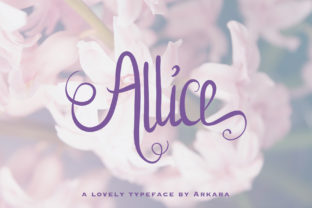
Allice: A Handwritten Font That Fits Real Creative Workflows
Allice is a cute and playful handwritten font with a unique twist—its romantic, delicate vibe doesn’t just look charming on screen; it functions thoughtfully in real-world creative and professional contexts. Unlike decorative fonts that sit passively in design libraries, Allice integrates meaningfully into planning, execution, and refinement stages across diverse workflows. Whether you’re sketching a brand mood board, drafting an email sequence, designing printable teaching materials, or refining a client presentation, Allice supports intention—not just aesthetics.
Where Allice Fits in the Creative Process
Fonts aren’t isolated assets—they’re part of a chain: idea → structure → expression → delivery → feedback → iteration. Allice lives most naturally between structure and expression. It’s not ideal for dense body copy or data-heavy tables, but shines where tone, warmth, and personality carry weight: headlines, callouts, invitations, social graphics, lesson handouts, product packaging labels, and personal branding elements.
Before launching a project, many creators use Allice to draft early visual concepts—mocking up Instagram story templates, workshop worksheets, or pitch deck title slides. Its legibility at medium sizes (16–32px) and subtle irregularity make it feel human without sacrificing clarity. During execution, designers often pair it with a clean sans-serif (like Inter or Lato) for contrast: Allice sets the emotional tone; the supporting font handles information density. After delivery, users consistently report higher engagement on visuals using Allice in headers or quotes—especially in education, wellness, and lifestyle niches where authenticity matters.
Practical Integration Across Tools and Platforms
Allice works reliably across major design and productivity environments. It’s available in standard OTF and TTF formats, making it compatible with Figma, Adobe Creative Cloud, Canva (via upload), Google Docs (with third-party add-ons), and even Notion when embedded as image assets. For developers integrating into web projects, it’s easily served via Google Fonts or self-hosted with proper @font-face declarations.
When preparing files for print or client handoff, always embed Allice in PDFs or convert text to outlines in vector exports—this prevents substitution if the recipient lacks the font installed. In collaborative tools like Figma, name your text styles clearly (e.g., “Allice Headline – Medium,” “Allice Quote – Light”) so teammates understand usage intent, not just appearance.
- For educators: Use Allice in weekly reflection prompts or student-facing rubrics—it softens formal language without undermining expectations.
- For freelancers: Apply it selectively in proposal cover pages or testimonial highlights to signal approachability before diving into scope details.
- For small business owners: Deploy Allice on seasonal sale banners or “thank you” cards—its rhythm slows the eye just enough to reinforce sincerity.
Workflow Examples You Can Adapt Today
Example 1: Launching a Digital Course
During the planning phase, use Allice in your course outline’s section headers and learning objective statements—not for the full syllabus, but to visually distinguish aspirational goals (“You’ll gain confidence writing heartfelt emails”) from logistical notes (“Module 3: 4 videos, 1 worksheet”). This creates psychological separation between inspiration and administration. Later, reuse those same headers in your sales page hero section and email nurture sequence, ensuring visual continuity from planning to promotion.
Example 2: Building a Newsletter Archive
Instead of defaulting to one font family throughout, apply Allice only to issue titles and pull quotes inside archived posts. Keep body text in a highly readable serif or sans-serif. This pattern trains readers to recognize voice shifts—Allice signals pause, emphasis, or invitation—while preserving scanability for longer reads. Over time, subscribers begin associating that delicate handwriting with your most reflective or personal content.
Example 3: Preparing Client Presentations
Start your slide deck with Allice in the title slide and key takeaway summaries—but switch to a neutral typeface for data charts, timelines, or feature comparisons. This isn’t arbitrary styling; it’s cognitive scaffolding. Allice cues the audience to lean in emotionally during vision-setting moments, while structural content remains frictionless to parse.
Usability Considerations for Long-Term Use
Allice’s charm lies in its balance: it’s expressive but not exhausting, distinctive but not distracting. Still, consistency requires intention. Avoid overusing it across every headline, button label, or caption—reserve it for moments where warmth directly supports your goal. If your brand voice is bold or technical, Allice may serve best in limited, high-impact roles (e.g., signature closing lines in emails or custom icons in dashboards).
Test readability across devices. At smaller sizes (<14px), some characters (like the lowercase “a” or “g”) lose definition on low-DPI screens. Stick to minimum sizes of 16px for web body accents and 20px for mobile app UI elements. For accessibility, never rely solely on Allice to convey hierarchy—pair it with size, weight, color, or spacing changes to maintain clear visual logic.
Organization matters, too. Store Allice files in a dedicated “brand assets/fonts” folder alongside your style guide. Name versions clearly (e.g., “Allice_v2.1_OTF”) and document usage rules—like “Allice used only for H2+ headings and pull quotes in marketing collateral.” This prevents drift when new team members join or tools change.
Quality Control and Refinement
Because Allice mimics handwriting, minor inconsistencies are intentional—but unintended rendering issues aren’t. Always preview exported files across browsers (Chrome, Safari, Firefox) and operating systems (macOS, Windows, iOS). Some older Android versions substitute fonts silently; test on physical devices when possible. If you notice uneven letter spacing in certain phrases, manually adjust tracking (kerning) rather than scaling the font—scaling distorts stroke weight and undermines Allice’s organic feel.
Track usage over time. After three months, review where Allice appeared in shipped work: Did it strengthen connection in customer-facing pieces? Did it slow down production because of repeated manual kerning? Was it misapplied in contexts where clarity outweighed charm? Let those observations inform your next round of guidelines—not rigid rules, but calibrated habits.
Final Thought: Let Allice Serve Your Intent
Fonts don’t work in isolation. Allice gains value not from how it looks alone, but how it behaves inside your process—from early ideation sketches to final handoffs. It supports empathy in communication, signals care in detail-oriented tasks, and adds quiet distinction to outputs that might otherwise blend in. The most effective use of Allice isn’t decorative. It’s deliberate: choosing where humanity needs to show up—and letting the font do the quiet work of making it felt.